Other topics
- How to enable day skin in any software
- How I recorded my old radio show recordings and found the IDs
- How I edited my videos showing the Traktor screen
- How I synchronize and backup my whole Traktor structure across laptops and a NAS
- How to replace the DDJ-1000 filter knobs with Silver knobs
- DJ Census over time results
How to listen to MixCloud sets without going nuts
Mixcloud is the biggest online free site to listen sets as it is 100% legal
However it is also the most annoying way to listen: * no rewind * forward movement is exponential * cant see the tracklist in advance * cant close the playing window at will
Solutions: * Install the "mixcloud with tracklist" chrome extension link * make sure you are logged-in * The tracklist lets you rewind * The small icon copies the tracklist to the clipboard * Install a programabble chrome extension, drop in a 10-line script, limit it to the site * tamper monkey plugin * popup block script * replace @match with: // @match ://.mixcloud.com/* * Regain your sanity
How I recorded my old radio show recordings and found the IDs
I had old K7s mixtapes from around 1996 from local radio shows that I really liked. These shows have significantly shaped my electronic music tastes. Recently I've took the time to preserve these relics, and find the IDs for the tracks that I've been looking for 22 years.
The steps were: * I've first recorded all my 15 cassettes in a single go. * Then added the cues in adobe audition. * Then split it by mix sessions. Sometimes it were just isolated tracks, sometimes it was a sequence of 10 tracks. * Then I've combined these into packs of 2 hours each. The first pack is now online: https://www.mixcloud.com/Dj_Estrela_House/radio-cidade-superpista-1997-recordings/ * Them made the known tracklist and exact timestamps using a CUE file
Regrading the IDs: * I've first extracted JUST the IDs into yet another pack. * This was uploaded to mixcloud: https://www.mixcloud.com/Dj_Estrela_House/superpista-ids-1997-recordings-full-versions/ * Benefits: * its much easier to show to knowledgeable DJs in a single go * mixcloud is able to identify some tracks for you
see also this forum post on reducing the hiss of K7.
How I edited my videos showing the Traktor screen
On my latest demo videos I show both the controller and the traktor screen simultaneously. It looks pretty cool. To get the basic idea, see this DJ tech tools article: https://djtechtools.com/2012/06/24/how-to-make-a-great-dj-video/ This is another one: https://www.digitaldjtips.com/2019/02/how-to-film-your-dj-mixes-using-your-phone/ This specifically covers smartphone placement
Concrete steps:
- Equipment
- Smartphone
- As much illumination as possible
- Buy a microphone stand with a strong hold: example
-
Buy a smartphone flexible tripod: example
-
Recording
- Put the smartphone as high as possible, and with the most illumination possible
- Grab the stand to a Tall chair, or to another fixed desk
- The crucial idea is that your scratching will not vibrate the smartphone
- Record the controller image in 16:9 format
- Record the laptop screen using this free tool
-
If its a tutorial spoken video, record the audio from the smartphone. If its pure DJing record the audio in a third channel from the Traktor or the mixer output
- Important: record all inputs with sound, even if only the Traktor recording will be the final.
- This will grealty simplify the tricky syncronization step
-
Editing part 1: merge everything to a single video
- Download the latest version of openshot. Read this tutorial for basics. this is another tutorial
- Use only 4:3 profiles so that you can fit the controller, the GUI, and a black banner at the very for your logo + Captions.
- To significantly speedup processing, use lower resolution profiles:
- Quickest editing: "QVGA 29.7 fps 320x240"
- Quick editing: "768x568 4:3 PAL"
- Export quality: "1024x768, 4:3 30fps"
- Create a new profile in your documents / .openshot / profiles folder, based on another 16:9 HQ profile)
- Add the Controller video on Track 1. Zoom out (ctrl+Scroll). Click in the very first frame. Use properties / Rotate to fix any rotation issues. On properties, set "crop X", "crop Y", "crop Height" and "Crop Width" to crop the controller to size. Use right click / transform to center and scale it to the half bottom of the screen. Use effects/Brightness to raise the light a bit. You can never get enough lighting.
- If the controller moves around when playing, you did NOT clicked in the very first frame
- another sign is that there is very small green dots in the timeline. These are called "keyframes"
- to fix this, RMB the changed properties, "remove keyframe", potentilly several times
- then edit the properties ONLY on the first frame
- Move the video to the middle of the timeline. Lock track 1 so that it no longer moves (track 1 / RMB / lock)
- Add the Screen video to Track 2. Do the same steps as before to crop and scale / center the video on the top part of the screen
- In VLC, sync the two videos by finding something unique (eg pressing play). Zoom in a lot. Get the HH:MM:SS values, and calculate the offset in seconds
- In Openshot, manually align the videos using this info. Disable snap for precise alignment. Turn on volume in all tracks for this operation only. Confirm that the alignment is good in the end of the video as well
- In the black bar above the GUI, add your logo and the title
- add this to another track (shift+t)
- In Powerpoint: Create some very big arrows in all 4 directions, set transparent color, generate individual PNGs from it
- Move the arrows around to identify particular things in the GUI and the controller (other than your mouse)
-
Render the final video in high quality MP4
-
Editing part 2: captions, cuts, effects, transitions, etc
- Get windows essentials 2012 archive link; install only windows movie maker 2012.
- To create separators: home / add / title; Then animations / wipe right / normal
- To create captions: home / add / caption; then set length
- to add additional arrows: add a caption with windings 3 font
- change project to 4:3 format
- export again in high quality
Customized openshot shortcuts: * ctrl+m: marker * crtrl+up: center playhead * J,L = fast forward * -/= = zoom in/out * ctrl+left/right: marker * left/right = frame by frame * shift+rleft/right: nudge * space, up, down: pause
How I synchronize and backup my whole Traktor music and configuration across laptops and a NAS
I have all my Traktor files synchronized between laptops. This includes 100Gb of music and all Traktor files.
I can use any laptop at any time, one at the time, and my whole collection is there fully analyzed. As my NAS is just another client, I get automatic RAID-0 backups as well.\ In a nutshell this is like having everything inside your own private google drive, without size limits.
My folder structure is: * C:\Main - Contains all my private files * \Traktor - Whole folder synchronized by resilio sync * .sync - Resilio private folder * \Generated * \Samples - All samples go here * \Remix_sets - all remix sets go here * \Recordings - all recordings go here * \Root_dir - All settings, stripes, etc go here * \Logs * \Stripes * etc * \Music - all my music goes here. Organization is by genres * \Genre_1 * \Genre_2 * etc
Steps on Laptop A: * Install resilio sync * Create "C:\Main\Traktor\" folder * Share the currently empty folder in resilio sync "C:\Main\Traktor" * Add the exceptions to the end of the ignore file: "C:\Main\Traktor.sync\IgnoreList" * Traktor Settings.tsi - very important to have different controllers, audio devices etc * collection.nml - optional, if want separate collections and write traktor data to mp3 files themselves * Restart resilio sync - DO NOT SKIP THIS STEP * Point your traktor root folder to "C:\Main\Traktor\Root_dir" (Settings / File / Directories / Root_dir) * Restart traktor - DO NOT SKIP THIS STEP * Do the same for samples, remix sets and recordings (Settings / File / Directories / Samples | Remix_sets) * Move your files to "C:\Main\Traktor\Music" * Do a Mass-relocate inside traktor for the new location ("consistency check") *
Steps on Laptop B: * Install resilio sync * Create "C:\Main\Traktor\" folder * Share that folder using the RW-key from laptop A * Wait for sync * Point your traktor root folder to "C:\Main\Traktor\Root_dir" (Settings / File / Directories / Root_dir) * Restart traktor - DO NOT SKIP THIS STEP
Warning: do a manual backup first before changing your traktor files and music collection!
more info #1 / more info #2 / more info #3
See also the DJ Freshfluke’s Traktor tutorial
How to choose fast USB pens for CDJ use
Article: https://www.facebook.com/groups/822722507863937/permalink/1472101869592661/


How to fix DDJ-1000 loose jogs
this reserach was done by Jason Louis in the DDJ-1000 Users Facebook group.
video: https://www.youtube.com/watch?v=LnvZR3Kiuxs
LOOSE JOG WHEEL DISCOVERY READ BELOW....
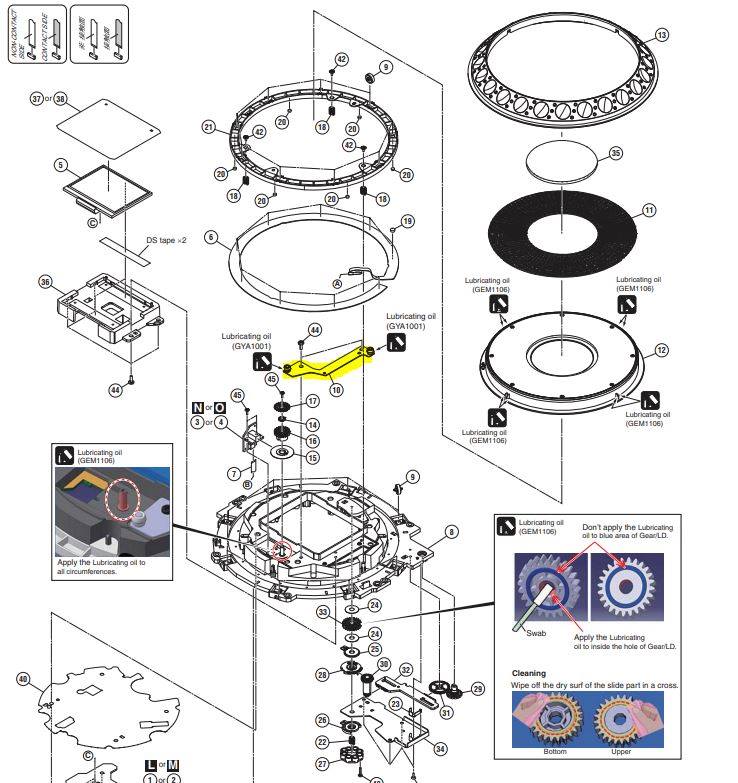
It seems the part that is responsible for keeping the jog wheel in place is not the rollers at all.
It’s a bracket that has two stationary barrels attached to it. The one in the back is for right to left movement and the one in the front is for front to back movement.
If you have a jog wheel that is loose this is the part that has failed or has come defective from manufacturing.
These barrels sit inside of a channel on the under side of the jog wheel top plate ( where your hand makes contact to scratch )
The way the barrels are held onto the bracket is they are pressed into the bracket and center-punched to mushroom the metal to lock it in place on the bottom.
-
When a jog wheel develops front to back movement the front barrel will be found to be loose and exhibit a wobble on the bracket.
-
When a jog wheel develops side to side movement the rear barrel will be found to be loose and exhibit a wobble on the bracket.
If you are able to carefully center punch the shaft from the bottom of the bracket it is possible to re-secure the barrel. Once the barrel is secured properly to the bracket your movement in your jog wheel will be eliminated.
I’m trying to get a part number(s) in case anyone is tired of sending in their unit and it coming back not fixed.
Honestly this is something that pioneer should have done a recall on as I’ve seen so many posts about it here and on forums and have spoke to SAM ASH and Guitar Center with both retailers aware and complaining about the issue.
Pioneers stance is to keep quiet when all they had to do is replace this bracket that probably cost them 5.00 to have made.
The labor for the repair is most likely why they are keeping quiet. It’s just unacceptable.
This is the part that is causing all the problems. I think it’s expensive for what it is but at least we have all the information we need. Please share this entire post if this can help someone.
https://www.instrumentalparts.com/stay-assy-jog/
Once you remove the back cover you will see many ribbon cables going to a main PCB. Once you remove all of those cables you will start to unscrew the Main PCB and lift out. After that you will need to take out the track load PCB the pad assy pcb and the loop pcb. once you remove those you can access the jog wheel screws. Note you will have to remove the track select knob , the tension adjust knob and the pitch slider cap to remove above boards before getting to the jog assy. unscrew 5 or 6 screw and remove jog assy and then you will see 2 tabs that can be pulled back gently and the jog wheel lifts up and off the unit. that's the easy part. keeping all the screws in order and where they go is something you should draw out somewhere or take pictures for the first time. ALSO make sure all the plastic buttons are seated properly when you put all the PCBs back so you don't have to reopen the device after you fully assemble it. Hope that helps
Understand how to remove the different ribbons cables, also there's a few wires that need to be placed back a certain way, if you keep good notes and have opened and worked around electronics before you can probably do it, but as I stated before... Unless you know what your doing and have some experience in working on electronics or computers I would have someone else do it.
it’s not easy and I would only recommend you attempt if your good with working on electronics. You have to disassemble a lot of the controller just to get the jog wheel out. Lots of ribbon cables and removing main and Aux PCB boards
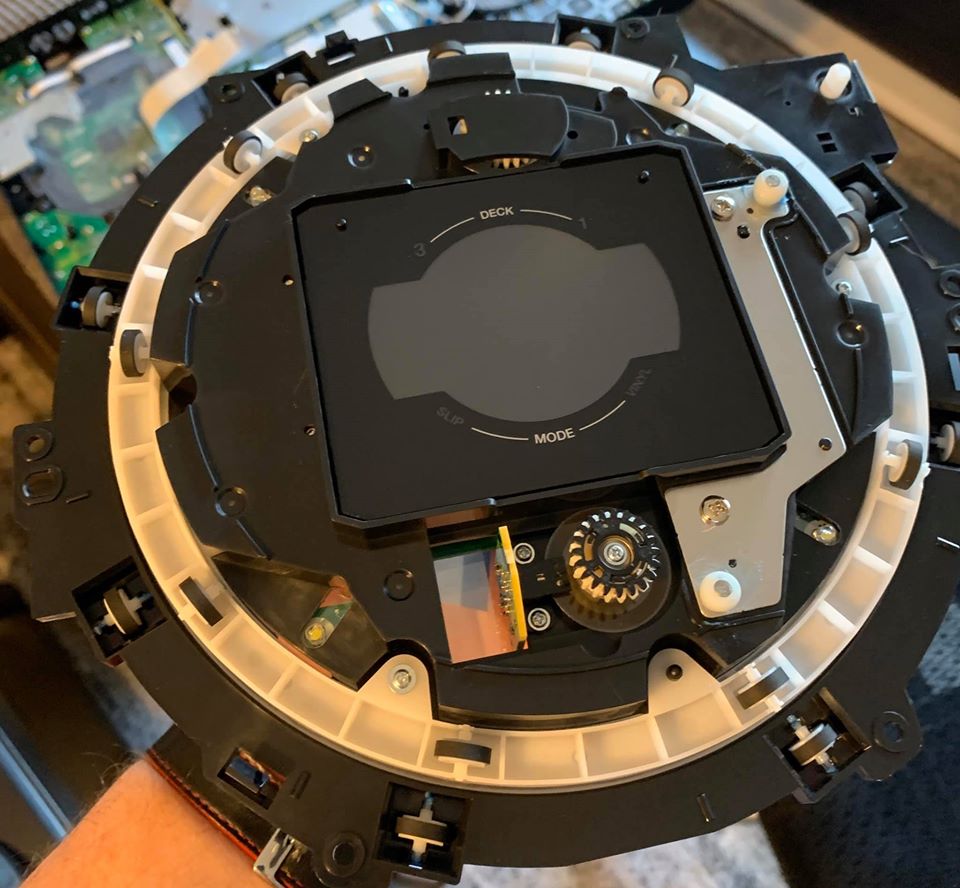 !
!
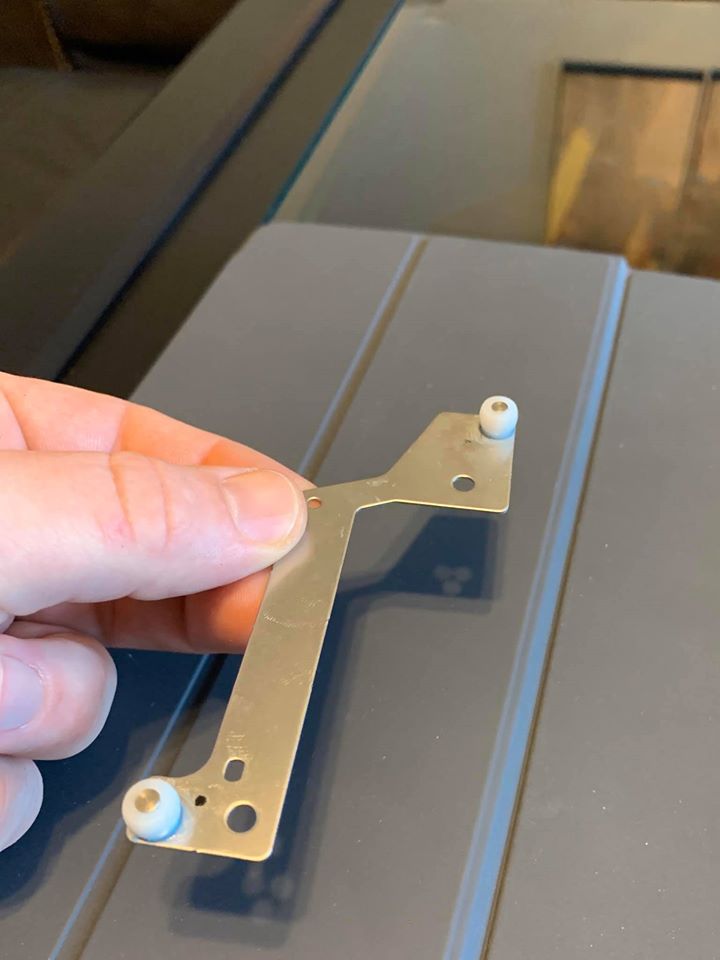 !
!
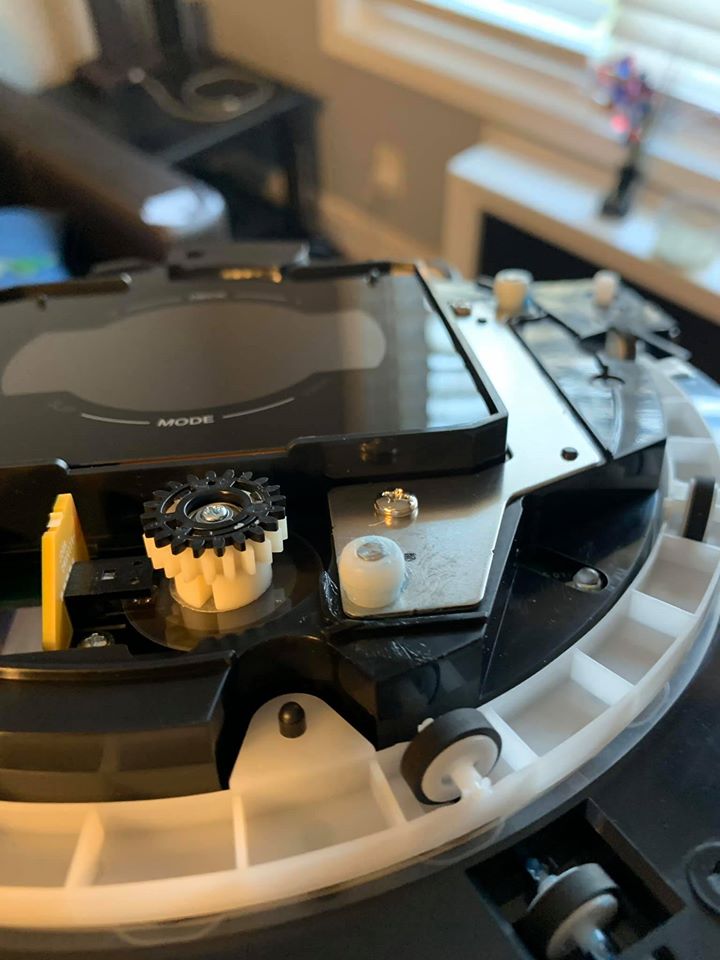 !
!
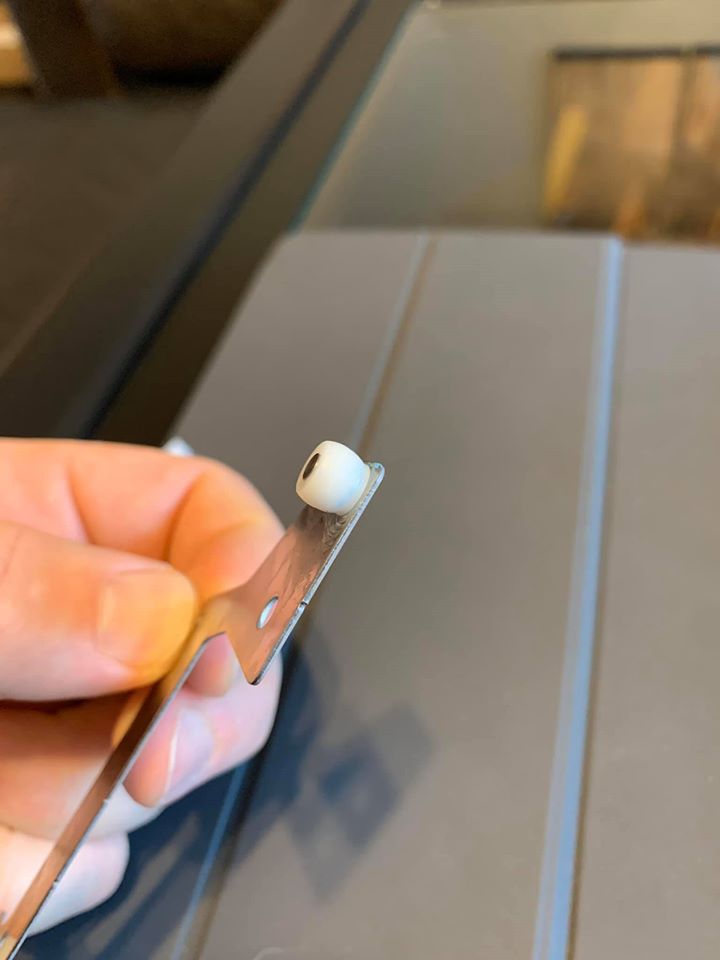 !
!
 !
!
How to replace the DDJ-1000 filter knobs with Silver knobs
Both 1000 and 1000SRT have extremely dull filter knobs. Which is a pity.\ For now the best fit is DAA1309 from the DDJ-SZ or DJM-900. This is an almost perfect fit.

Folder with pictures of the knobs: here
- DAA1309:
- This has the best fit overall. The knob is slightly higher than desired.
-
Part list: \ DJM-900NX2/2000NX1/750\ DDJ-SZ/ DDJ-RZ/ DDJ-RZX
- this was confirmed NOT to work
-
parts list: DJM-S9 / DJM-900SRT / XDJ-RX / XDJ-RX2
- not tested
-
part list: DDJ-RX
- not tested
-
parts list: DJM750 MK2 / 250MK2 / 450 / S3
- this was confirmed to work by another user


DJ Census over time results
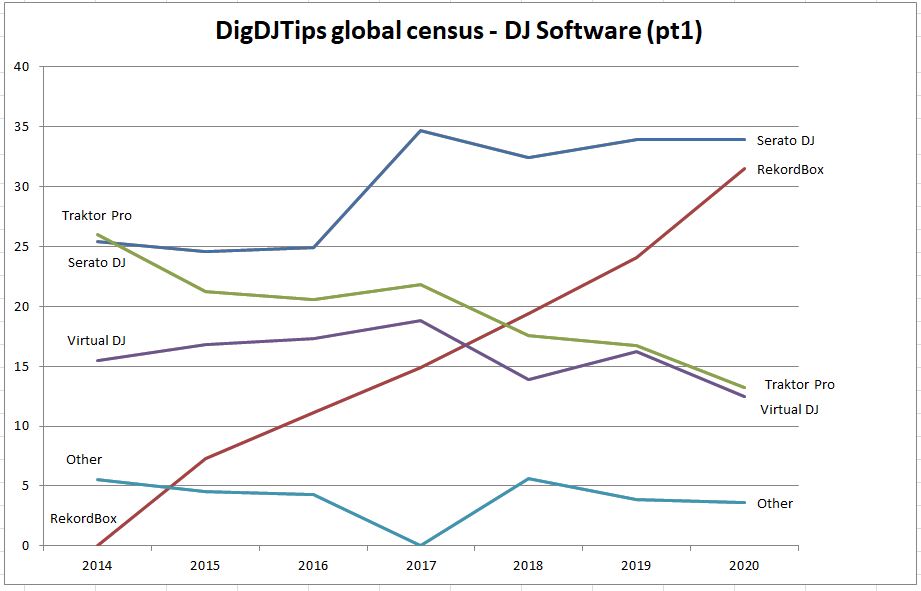
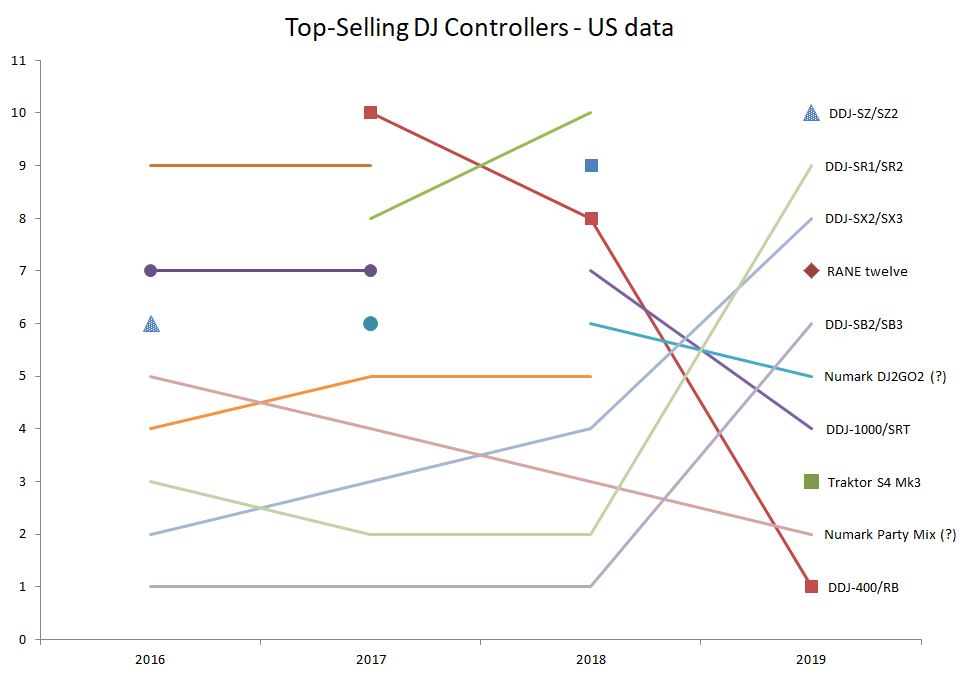
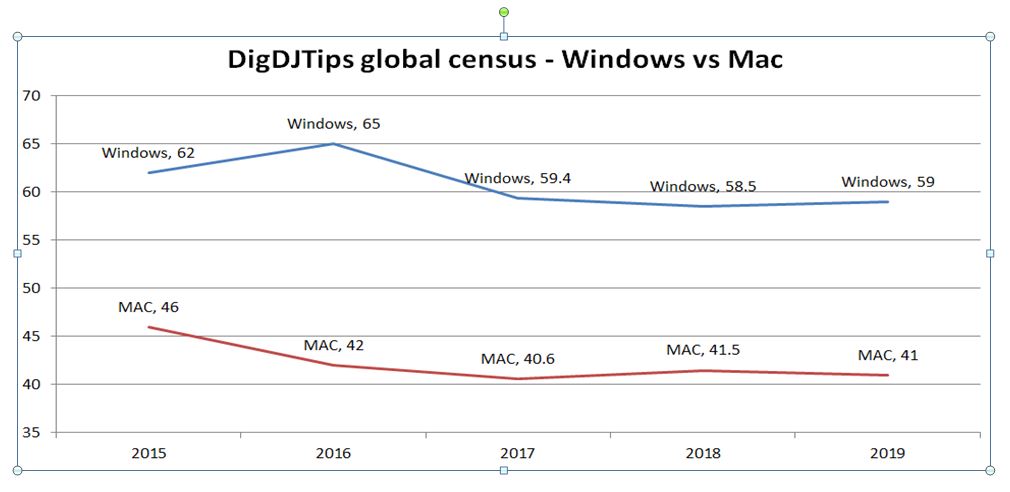
Digital DJ Tips and DJ Tech Tools collect yearly data on the most popular software and controllers. Every year I update this page with the new data points over time. Source files are here
See also the most popular DJ softwares census.\ See also the graph showing the most popular DJ softwares over time.
About Dj-Skins.com
I recommend you to change the look of your device and protect it against fingerprints by using a Skin from http://dj-skins.com.
It looks gorgeous!
Please see the full gallery here.
Example:

21st century software issues
The 21th century has very clear trends where software cost go down every year. The main factor of this is simplification and lower quality / minimum viable product, many times at the user burden. Some examples follow.
Required Updates:
To reduce cost, both backwards and forward compatibility
are dropped. Its far far simpler to the developer to just force the user to upgrade all components if just one them gets upgraded.
Instead of checking what actually changed, and if the old/unchanged functions would just work fine with the previous version.\
Typically the server gets updated first, then the client App needs to follow.
Some years ago changes and all protocols had compatibility in mind, so that the user could continue using the previous version as long as possible (except urgent security updates).
Poor Documentation:
Today apps are far far simpler to use for the simple tasks. That is great.
However, the complex tasks are being dumbed down by force, and worse, they are no longer documented structurally anymore.
The existing documentation all moved online and is searchable. That is reasonable, but typically there is no longer structured manuals that would explain the features of eg your new mobile phone, and every single configuration option.
Other examples are the dumbing down of laptops to approach tablets by force (Windows 8 comes to mind). A Tablet is great for content consuming, but a laptop is irreplaceable for content producing.\
Specific examples are Function and insert keys being secondary, the loss of physical buttons like ESC in mac, short keyboards without insert/delete section like it was present on the standard 102 keyboard
Subscriptions / Ownership:
Every year there is fewer laptop users. The "buy once, use forever" model is no longer profitable to small and medium businesses that make unique software. The only solution was to ask money for newer major versions of the software. Every year this gets more and more difficult.
The alternative is subscriptions that stop working if you stop paying. Another worrying trend is companies lawyers that removed the notion of ownership, giving you an authorization instead.
Yet another worrying trend is hardware features that are unlocked by software. Back in the days, the price segmentation was clearly made because of hardware limitations: it was physically impossible to send more data / driver faster / etc. Today, the hardware has gained massive leaps in specifications, but then they come lobotomized by default, and sold as a software upgrade.
Knowledge base organization
I'm looking for a solution to organize this knowledge base :)
Any help is welcome.
Requirements:
* Have everything in a single markdown page
* TOC
* Left sidebar always visible
* auto generated
* Expandable sections
* All headers with link anchors
* "git push" triggers pipeline
Non-requirements: * chronological blog posts * separate files * categories * multiple users * user comments
Candidates: * readthedocs site itself * readthedocs template for jekyll * mkdocs, runthedocs, justthedocs * github wiki * guthub pages (default template) * minimal mistakes jekyll template * mediawiki
Some metrics of my free contributions
These are my biggest crontibutions.\ What did you enjoyed the most? please tell me to pedro.estrela@gmail.com
- Knowledge Base: 16K words
- https://github.com/pestrela/dj_kb
- DDJ-1000 mapping: 4.6K downloads
- https://maps.djtechtools.com/mappings/9279
- DDJ-SX2/SZ/SRT mapping: 3.5K downloads
- https://maps.djtechtools.com/mappings/9222
- CMDR Changelog: 80 lines
- https://github.com/cmdr-editor/cmdr#2020-improvements
Open questions for 2021
Question #1:\
What is the future of controleirism in 2021?
Why do the new generation of DJs seem apparently satisfied with the current capabilities of Serato and Rekordbox "as-is"?
Question #2:\
How could happen that Traktor/NI dropped the jogwheel in 2014 with the S8/remix decks, but in 2021 is still the ONLY major sofwtare without flexible beatgrids?
question #3:\
What is your opinion of realtime STEMS seperaation of VDJ 2021 and Djay AI?
Some people from which I've learned a lot from the Global DJ community
"AKA my DJ hall of fame".

When I started DJing in 2000 I've learned a lot from local DJs in Lisbon that I've meet regularly.\ The ones I worked the most were Rui Remix, Bruno Espadinha, Joao Vaz, Jaylion, Miguel Assumpcao and DJ Ice.
20 years later the Internet changed this locality a lot.
You can now learn anything from youtube tutorials, reading articles and have insightful conversations with people that you may never meet.
Below some of the people that I've learned the most. Apologies if I forget anyone.\ All of them made significant contributions either in articles, software or video tutorials. In the vast majority this is applicable to any DJ software.
Most of them I've either meet them in person, or I had numerous conversations with them over chat.
- Ean Golden:
- Inventor of Controlerism, Founder of DJtechtools, Hundreds of articles, Workshops
- https://djtechtools.com/author/Admin/
- https://djtechtools.com/2015/05/17/the-history-of-dj-techtools/
- reddit answer
- Phill Morse:
- Founder of DigitalDJTips (biggest online DJ school), Hundreds of articles
- https://www.digitaldjtips.com/category/news/
- Stevan Djumic:
- Dozens of very high quality Traktor mappings. Reverse engineering his mappings was a major turning point for me.
- https://my.djtechtools.com/users/3776
- Jeroen Groenendijk:
- Multiple workshops and generic techtalks
- https://www.facebook.com/pg/DJResource/videos/
- Mix Master G:
- Author of the DJCU converter. Dozens of videos about conversion and DJ collection management
- https://www.youtube.com/channel/UCMXHg5Oi8vlfKyEvsgrMRuQ/videos
- Christiaan Maaks:
- Author of the rekordcloud online converter. Lots of generic info applicable to all converters
- https://rekord.cloud/wiki/
- Alex Coyle:
- Author of the open-source DJ converter. I worked with him over months to research the 26ms shift problem
- <https://github.com/digital-dj-tools/dj-data-converter/issues/3
- DJ TLM:
- Dozens of tutorials on Scratching>
- <https://www.youtube.com/user/djTLMtv/videos?view=0&sort=dd&flow=grid
- Teo Tormo:
- Dozens of articles on advanced midi mapping and DJ hacking.
- https://djtechtools.com/author/teotormo/
Honorable mentions:\ These individuals also made contributions that benefit a lot of users.\ Biggest difference to the group above is that I had much less interactions with them.
Damien Sirkis (RekordBuddy), Florian Bomers (BOME), Steven Caldwell (BOME), Michael Rahier (CMDR), Klaus Mogensen (VirtualDJ), DJ Rachel (VirtualDJ), Carlo Atendido (Tutorials), Pulse (Rekordbox), DJ Keo (Industry Commentary), Mojaxx (Serato), Gábor Szántó (DJ Player Pro), Friedemann Becker (Traktor), Mike Henderson (DJ Endo), Stephane Clavel (VirtualDJ), Jamie Hartley (WeAreCrossfader), madZach (Production and DJing), DAVE (Tutorials), Sara Simms (Reviews, Tutorials), Joe Easton (S4 MK3 Screen), Aleix Jiménez (S5/S8/D2 Screen + Mapping mod), Erik Minekus (S5/S8/D2 Screen modifications), Kokernutz (S5/S8/D2 and S4 Mk3 Screen modifications), Mark Settle (DJ Worx founder), Ray Arkaei (XMG tuned DJ laptop),