Free DJ Software Tools
This section groups the DJ software tools written by me, all freely available.
- Traktor tools overview
- CMDR TSI editor
- Swapping Traktor settings
- Tracklist and CUE tools
- Youtube, Google an Discogs shortcuts
- Github Markdown tools
- Programming libraries
What software tools did you built for Traktor?
This folder contains my Traktor tools and CUE tools. Below is a summary; see here for more details
See also the CMDR editor changes.
- Traktor_clone_cues
- Clones cues between physically duplicated files.
- Is also able to merge traktor NML files.
- rekordbox_add_beatmarkers
- adds a beatmarker every 4 beats. Part of the elastic beatgrid emulation
- CUE_tools
- Tools to generate CUE files and timestamped tracklists
- Tools to search a whole set in youtube tabs and to scrape lyrics
- My mp3tag actions scripts
- Adaptor scripts to run DJCU and Rekordbuddy in Windows
- 26ms offsets
- Research about the 26ms mp3 cue shifts in DJ conversion apps. More info
- BOME tools:
- Easy wrapper around the BOME analyser that documents variables, and a new script to find unused variables: download
- Deck duplicator with emulated arrays:
What features did you add to the CMDR TSI editor?
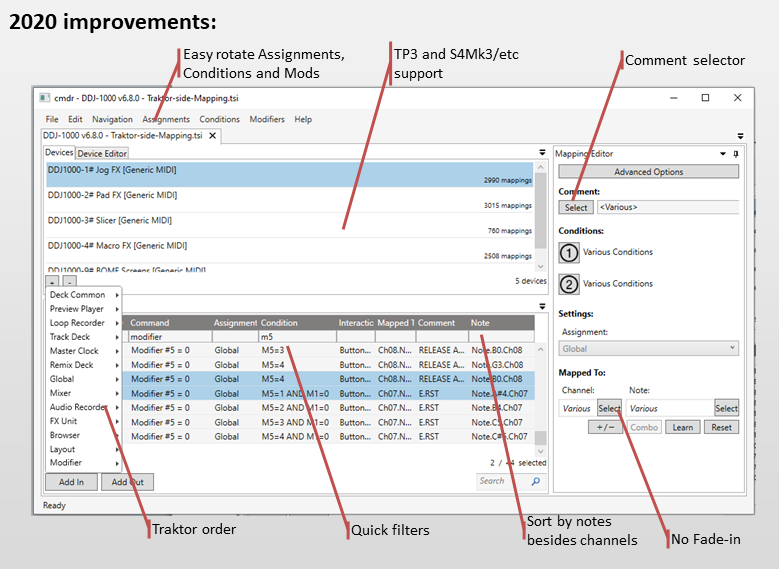
The CMDR editor did not get new features for 2.5 years. In Jan 2020 I've revived this project. * Download: https://github.com/cmdr-editor/cmdr/releases/latest/download/cmdr_tsi_editor_latest.zip * Documentation: https://github.com/cmdr-editor/cmdr#2020-improvements
Highlights: * TP3 and S4-MK3 support * Grid quick filter * many new Shortcuts (channel change, modifier rotation * FX list and encoder mode fixes; same sorting as controller manager
How can I run CMDR in my macOS?
There is three ways to edit your mappings in macOS.
Simplest: Xtrememapping
The simplest answer is: buy a copy of XtremmeMapping for macOS.
More complex: Azure Cloud
The more complex answer is: get a free trial of a windows virtual machine.
This will run in the "azure" microsoft cloud, and requires giving your credit card to detail to microsoft (they say over and over that no automatic billing will ever happen after the trial period without you changing your )
installation: * link1: https://microsoft.github.io/AzureTipsAndTricks/blog/tip246.html * link2: https://www.techrepublic.com/article/build-your-own-vm-in-the-cloud-with-microsoft-azure/
Then connect to your cloud machine using RDP for mac: https://www.techrepublic.com/article/pro-tip-remote-desktop-on-mac-what-you-need-to-know/
Then: * Install CMDR as explained here: CMDR installation instructions * Copy your TSI into the virtual machine (simplest is to use eg google drive on the browser)
Most complex: VirtualBox
The most complex answer is: get a personal virtual machine couples with an evaluation copy of any Windows OS.
Step by step instructions are on: * https://towardsdatascience.com/how-to-install-a-free-windows-virtual-machine-on-your-mac-bf7cbc05888e * Step 1: Download VirtualBox * Step 2: Grab Windows 10 * Step 3: Install VirtualBox and the extension pack * Step 4: Get your OS up and running
Then: * Install CMDR as explained here: CMDR installation instructions * Copy your TSI into the virtual machine (simplest is to use eg google drive on the browser)
How to run macOS on windows and linux
I've sucessfully ran MacOS in a windows machine usig virtualBox: * https://www.soupbowl.io/2020/04/macos-in-virtualbox/
If you are in linux you can get a docker image premade: * https://github.com/kholia/OSX-KVM * https://github.com/sickcodes/Docker-OSX/
Future windows WSL2 will be able to run docker images as well. Requirement is windows 2004 (from april 2020) * https://docs.microsoft.com/en-us/windows/wsl/tutorials/wsl-containers * https://code.visualstudio.com/blogs/2020/03/02/docker-in-wsl2
How I build perfect tracklists using CUE files
I use a set of tools to generate a CUE file with the timings of my sets. Once I have this file, I can generate tracklists with timestamps like in this example: https://www.mixcloud.com/dj_estrela/mix-17-cd07-trance-jun-2019/
Steps BEFORE the set (for prepared sets): * group the files in folders, per style (Vocal Trance, Uplifting trance, etc) * select the tracks and their order using winamp; Once this is OK, run "cue_renumber_files.py" and "cue_make_tracklist.sh".
Steps AFTER the set (both live sets and prepared sets): * convert the NML to a text tracklist using https://slipmat.io/playlists/ * listen the recording in winamp to spot major mistakes. Tag the locations in MMM:SS format. At the end, use "cue_convert_timestamps.sh" to convert to HH:MM:SS format * open the huge WAV file in Adobe audition, and perform the following: * normalize volume of all tracks * fix any obvious mistakes if necessary (eg, track ended too early when playing live, etc) * tag the divisions of the tracks inside the wav file * convert the tags inside the WAV into a CUE file, using this software: http://www.stefanbion.de/cuelisttool/index_e.htm * note: this software fails on files bigger than 2Gb (https://forums.adobe.com/thread/309254). Workaround is splitting the file at the 3hour mark, exactly, then use an option in cue_merge_cues.py to add this offset back in the second file * convert the tags inside the WAV into a CUE file, using this software: http://www.stefanbion.de/cuelisttool/index_e.htm * merge the CUE file with the Tracklist file using cue_merge_cues.py * upload the mix to http://mixcloud.com/dj_estrela * transfer the mix automatically to https://hearthis.at/djestrela/#sets
Overview of the Cue tools:
- cue_renumber_files.py:
- renumbers mp3 files, in sequence. This is useful to make a sequenced playlist in your operating system folders, outside Traktor.
- cue_make_tracklist.sh:
- from a folder, generates basic tracklist text files
- cue_convert_timestamps.sh:
- convert MMM:SS to HH:MM:SS format. Winamp uses the first format, Adobe audition uses the second
- cue_merge_cues.py:
- this is the main tool. It merge back and forth any CUE file with any tracklist text file. It can read either case from separate or single files. It also cleans the artist - title fields, and generates timestamped tracklists
- cue_rename_cue.sh:
- matches the CUE file contents with the FILE tag. This is useful when you rename the files externally.
How much time do you take to make each mix
A LOT of time. Much much more than simply the running time of each mix.
I'm always easily preparing/recording/finishing say 8 mixes at a time,
so the whole process for any given mix can easily take months.
Why so much time? Is is worth it?
You tell me :). Check for yourself in https://djestrela.com/. List of styles are in the bottom of this post.
In short all my mixes are carefully planned to tell a story, by focusing on a specific overall theme or sub-sub-style. All my mixes are post-mastered with a single loundness, and feature a clean tracklist and whole lyrics.
I've built some software tools to speedup some parts of this process.
Major styles in https://djestrela.com/: * Trance * Vocal Trance * Uplifitng Trance * Tech Trance * 80s: * Italo Disco * Rock FM * "regular" 80s Pop and Rock * Top-40 * Commercial House, per decade * Latin / Reggaeton
See below for a much more detailed version of this post.
How much time do you take to make each mix - Worst case
In the worst case I take months to do a single 90 minute set. This post describe all steps of such mix.
Preparation: * find music: * * collect * group the files in folders, per style (Vocal Trance, Uplifting trance, etc) * select the tracks and their order using winamp; Once this is OK, run "cue_renumber_files.py" and "cue_make_tracklist.sh".
TODO: finish this post, add picture
What Programming libraries and technical scripts did you author?
Please see my open-source github repos in https://github.com/pestrela?tab=repositories See also my windows shortcuts
Summary: * Yapu: Yet another python libary * this is a python3 library for helper wrappers, classes, etc * https://github.com/pestrela/yapu * Yabu: Yet another bash library * this is a collection of hundreds of bash scripts that wrap common * also includes a full set of bash libraries of functions * https://github.com/pestrela/yabu * cdd_bash: * aliases to transfer the current directory between terminal windows * https://github.com/pestrela/cdd_bash * smi_counter: * windows SMI counter. Useful for detect laptop DPC stalls * https://github.com/pestrela/smi_counter
Open-Source useful information
Below some links useful to build open source projects
- Choose a license:
- This sites compares licenses from more to less requirements.
- https://choosealicense.com/licenses/
- detailed table)
- Semantic version:
- Explains how to versions work, namely backwards-compatible changes
- https://semver.org/
- Keep Changelog:
- Explains what to put on the git log message
- https://keepachangelog.com/en/1.0.0/
Regarding DJ software, it useful for companies to jumpstart their innovation with open source technology. For new stuff like STEMS realtime generation it is far quicker to use this, than to developing your own technology.
The MIT license choose by Spleeter its very permissive and has very few conditions: https://choosealicense.com/licenses/
This is a general example where you just need to attribute things:\ "Third Party Software Acknowledgements" https://www.denondj.com/product-legal-sc5000-prime
Compare this to the GPL, where you need to make your own code that extends it GPL as well: https://www.pioneerdj.com/en/support/open-source-code-distribution/gpl-lgpl-source-code/
Github Markdown tools
- Better Cheatsheet: https://gist.github.com/jonschlinkert/5854601
- Tables Generator: https://www.tablesgenerator.com/markdown_tables
This is a small program to check relative links inside the same MD document: md_check_relative_links.py.
What shortcuts you added for Youtube, Google and Discogs?
This folder contains Windows tweaks and other generic tools.
My autohotkey file (AHK) has all kinds of
useful global shortcuts that work for any text of any program.\
All these shortcuts operate in a single line, or a list of lines:
* CTRL+F08: Search in Google
* CTRL+F09: Search in File Explorer
* CTRL+F10: Search in Soulseek
* CTRL+F11: Get current URL
* CTRL+F12: Search in Youtube (first hit)
* Win+backspace: toggle any window to be "always on top"
* Win+Arrows: Arrange windows on the corners, 3 possible sizes. Also supports regular half-screen
* Win+Insert: Append a copy to the clipboard. Really useful to collect things around and paste once
Using Shift you get varitions of the above: * CTRL+SHIFT+F08: Search in Discogs * CTRL+SHIFT+F11: Get all tabs url * CTRL+SHIFT+F12: Search in Youtube (list)
More scripts in this folder: * a youtube-dl wrapper * a tool to search 1001tracklists, ticketswap and DJ TechTools maps.